Home
›
Gadgets
›
NFC ACR122U
NFC ACR122U
🚧 Work in Progress
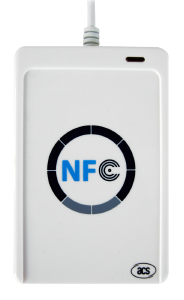
This page is for “NFC ACR122U” - USB NFC/RFID reader for card analysis and programming.
The NFC ACR122U is a USB-based NFC/RFID reader for card analysis and programming.
Primary Use Cases : Card identification, sector analysis, key recovery, and card reprogramming for educational and authorized testing purposes. The device works well with various software tools for both reading existing cards and writing new data to formatted cards.
Technical Specs
Interface : USB 2.0Supported Cards : ISO 14443 Type A/B, ISO 15693, Mifare Classic/Plus/UltralightOperating Frequency : 13.56 MHzCommunication : PC/SC compliantPower : USB bus poweredOperating System : Windows, macOS, LinuxDimensions : 85 x 54 x 5 mm
Supported Card Types
MiFare Classic 1K - 1KB memory, 16 sectors, 4 blocks eachMiFare UltraLight - Basic NFC functionalityMiFare NTAG216 - High capacity NFC tagsMiFare UltraLight EV1 - Enhanced UltraLight variant
Useful Applications
Card Analysis and Reading
NFC Tools - Android app for card identification and basic operationsMiFare Classic Tool - Comprehensive MiFare Classic card analysisMCT-bruteforce-key - Fork with enhanced key recovery capabilitiesPC/SC - Standard card reader interfacelibnfc - Open source NFC library
Key Recovery and Security Testing
mfoc - Nested attack automation for MiFare Classic cardsmfcuk - Dark-side attack automationMiFare Classic Tool - Sector analysis and key recoveryNFC ReTag - Alternative approach using unique card IDs
Card Programming
NFC Tools - Write data to formatted cardsFactory Formatting - Reset cards to original stateCustom Data Writing - Program cards with personal informationContact Information - Create NFC business cards
Tips and Tricks
Card Analysis Workflow
Card Identification : Use NFC Tools to identify card types (MiFare Classic 1K, UltraLight, NTAG216, etc.)Sector Analysis : Use MiFare Classic Tool to read all sectors with standard keysKey Recovery : Use MCT-bruteforce-key for enhanced key recovery capabilitiesFactory Formatting : Format cards to original state before reprogramming
Security Testing
Nested Attacks : Use mfoc for automated nested attacks on MiFare Classic cardsDark-side Attacks : Use mfcuk for dark-side attack automationWrite Protection : Check for write locks before attempting to modify cardsAccess Conditions : Understand sector access conditions and permissions
Card Reprogramming
Data Writing : Use NFC Tools to write custom data to formatted cardsContact Cards : Create NFC business cards with contact informationURL Redirection : Program cards to redirect to specific URLsAlternative Approach : Use NFC ReTag for unique ID-based card interactions
Best Practices
Educational Use : Use only for educational and authorized testing purposesCard Handling : Handle cards properly to avoid damageDriver Installation : Install proper drivers for your operating systemCross-platform : Use libnfc for cross-platform compatibility
Reference material